

why choose us
Quality Assurance
OPTICO has passed ISO9001-2015/CE/CPR/ROHS/FCC certification and have reliability test reports from 3rd party lab.
Strong Production Capacity
OPTICO has developed its total production area to 20,000 square meters, and has 400 production and testing equipments.
Professional Team
OPTICO team will respond you within 12 hours to provide the most suitable rather than the most expensive solutions.
Responsibility
With OPTICO scientific quality monitoring and warehouse tracking system, it solves every unexpected problem honestly and quickly.
What is SFP Modules
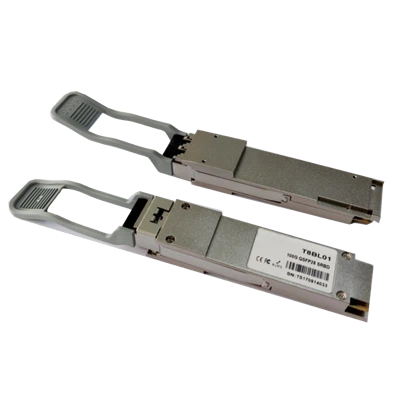
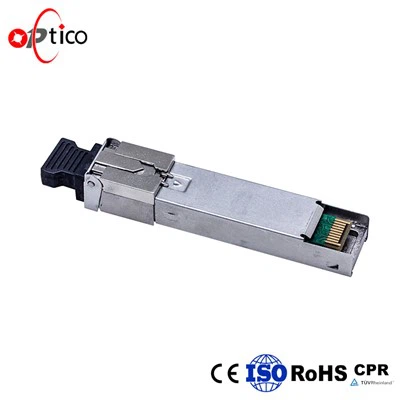
An SFP module is used to interconnect fiber cables to network switches and other communication devices, such as industrial Ethernet switches and media converters. The hot-swappable device allows the user to equip an interface port with any suitable type of transceiver, which is often necessary for fiber optic connections.




Advantages of SFP Modules
Cost-Efficiency Network Connection
SFP modules are a cost-effective solution for network expansion and upgrades, allowing for progressive growth without requiring significant infrastructure investments. Despite the introduction of faster Ethernet standards, SFP modules remain cost-effective, finding a balance between performance and financial limitations. This cost-effectiveness is especially appealing to enterprises looking to optimize the value of their networking investments.
Reliability Under All Conditions
SFP modules are highly regarded for their reliability under a variety of scenarios. These modules provide consistent performance even in tough situations like severe temperatures or electromagnetic interference. Their robust design and high-quality components help to ensure continuous data transmission and network reliability. Their durability minimizes the need for frequent replacements, reducing downtime and associated expenses.
Real-World Applications Across Industries
Renowned for their stability, adaptability, and reliability, the 1G SFP modules ensure consistent and reliable connections, making them ideal for a wide range of applications across industries: - Data Centers: Supporting high-density data center environments with cost-effective, high-performance networking solutions. - Telecommunications: Used for connecting cell towers and central office equipment, ensuring dependable network coverage. - Finance: Ensuring secure and high-speed data transfer within financial institutions to maintain transactional integrity. - Education: Enhancing connectivity within educational institutions, enabling smooth online learning and collaboration experiences. - Healthcare: Facilitating seamless communication within hospital networks to support critical patient care operations.
Seamless Maintenance and Troubleshooting
SFP modules offer significant advantages in terms of seamless maintenance and troubleshooting. These modules enable proactive maintenance by allowing for easy replacement without disrupting network operations. With their hot-pluggable design, faulty modules can be quickly identified and replaced, minimizing downtime and ensuring continuous network reliability. Additionally, the interchangeability of SFP modules simplifies troubleshooting processes, as technicians can swiftly swap modules to isolate and address issues.
Types of SFP Modules


SFP
The standard SFP module, also known as SFP transceiver or mini-GBIC, is the most commonly used type of SFP module. It supports data rates of up to 4.25 Gbps and can transmit and receive Ethernet signals over optical fiber or copper cables. SFP modules are hot-swappable, meaning they can be inserted or removed while the networking equipment is still powered on.
SFP+
SFP+ modules are an enhanced version of the standard SFP modules. They offer higher data transmission rates of up to 10 Gbps and are primarily used in high-speed networking applications. SFP+ modules are often used in data centers, storage area networks (SANs), and other applications that require high-speed data transmission over short distances.
BiDi SFP
BiDi (Bidirectional) SFP modules are designed to transmit and receive signals over a single fiber optic cable. They use wavelength division multiplexing technology, where different wavelengths are used for upstream and downstream communication. BiDi SFP modules are cost-effective and enable bidirectional communication over a single fiber, making them suitable for applications with limited fiber availability.
CWDM and DWDM SFP
CWDM (Coarse Wavelength Division Multiplexing) and DWDM (Dense Wavelength Division Multiplexing) SFP modules are used to increase the capacity of optical networks by multiplexing multiple wavelengths onto a single fiber. CWDM modules support up to 18 wavelengths, while DWDM modules can support even more, depending on the model. CWDM and DWDM SFP modules are ideal for long-haul transmission and can be used in telecommunications, cable TV, and other high-capacity data transmission applications.
Copper SFP
Copper SFP modules, also known as RJ45 SFP modules, are used when a copper connection is required instead of fiber optic cables. They provide Ethernet connectivity over twisted-pair copper cables. Copper SFP modules support data rates of up to 1 Gbps and are commonly used in scenarios where fiber installation is not feasible or cost-effective.
Application of SFP Modules
In modern enterprise data centers, high-speed connectivity and low-latency performance are crucial. SFP modules, especially those utilizing 10 Gigabit Ethernet (10GbE) or higher data rates, are widely employed to link servers, storage devices, and switches. The small form factor enables high-density deployments, optimizing rack space utilization. Additionally, SFP modules with Single-Mode Fiber (SMF) can extend data transmission distances over several kilometers, making them suitable for long-range connections between data centers.
Metropolitan Area Networks require robust and reliable connectivity to connect multiple buildings and sites within a city or urban area. SFP modules, with their ability to transmit data over long distances with minimal signal degradation, are ideal for building MANs. Their hot-swappable nature also simplifies network maintenance and upgrades.
SFP modules can be used in wireless networking equipment, such as Wi-Fi access points and base stations. These modules provide backhaul connectivity between different wireless nodes, ensuring fast and stable data transmission. Moreover, SFP modules operating at higher frequencies, such as 60 GHz for millimeter-wave communication, are becoming popular for short-range wireless links.
The demand for high-speed internet services in residential areas has led to the adoption of FTTH networks. SFP modules are used to establish the last-mile connection between the service provider's central office and individual homes. With their compact size and easy installation, SFP modules facilitate efficient FTTH deployments, delivering ultra-fast internet access to end-users.
SFP modules are employed in video surveillance systems to transmit video data over long distances. The use of optical fiber ensures reliable video transmission with minimal signal loss, making it suitable for surveillance cameras placed in remote locations or harsh environments.
Components of SFP Modules
Shell
The shell of the SFP module is a miniaturized metal shell that protects the internal optical and electronic components and provides stable connection and plug-in functions.
Optical interface
The front end of the SFP module usually has an optical interface for connecting to the optical fiber. Common optical interface types include LC, SC, ST, etc. Choose the appropriate module according to different connector types.
Electronic interface
There is usually an electronic interface on the back of the SFP module for connection to the device’s electronic system. This interface transmits electronic signals, including data, control and monitoring signals.
Optical and electronic components
The SFP module contains optical and electronic components for transmitting and receiving optical signals. These components include laser diodes (LD) or light-emitting diodes (LED), photodiodes (PD), modems, electronic chips, etc.
How to Use SFP Module
Step 1: Install Card Lock
First, insert it firmly to the bottom until you feel a slight vibration or hear a “pop” sound. This means that the SFP module’s card lock has been locked in place.
When inserting the SFP module, make sure the handle ring is closed.
After inserting, you can gently dial the SFP module to check whether it is installed in place.If it cannot be pulled out, it means it has been inserted to the bottom.
Step 2: Connect Optical Fiber
Insert one side of the optical fiber into the optical fiber interface of the SFP module to make sure the connection is firm.
Then plug the other end into the fiber optic interface of the fiber optic transceiver or other SFP module.
Step 3: Connect the Power Supply
Connect the adapter or other power supply to the power interface of the SFP module according to the module’s specifications and needs.
Make sure the power connection is stable and reliable.
Step 4: Setting Parameters
Based on actual needs, use the management interface or command line interface provided by the device.
Then set the working mode, speed, power and other parameters of the SFP module. The settings of these parameters will affect the performance and transmission effect of the optical module.
Step 5: Start the Device
After the connection and parameter settings are correct, turn on the power supply switch of the SFP module and start the device.The SFP module will automatically send and receive optical signals after startup.
Step 6: Monitor and Maintain
Lastly, regularly monitor the transmit and receive power of the SFP module and make adjustments as needed.

To install and remove SFP modules, follow these steps:
- Ensure the network device is powered off and disconnected from the power source.
- Locate the SFP module slot on the device. It is usually found on the front or rear panel.
- Remove the protective cover from the SFP module slot.
- Hold the SFP module by its sides, align the module's connector with the slot, and gently push it in until it clicks into place. Ensure it is inserted fully.
- To remove the SFP module, press the module's ejector tab or latch, usually located on the front or rear panel of the device. This will release the module from the slot.
- Gently pull the module out of the slot by holding it by its sides. Avoid touching the module's optical components.
- If necessary, replace the protective cover on the SFP module slot.
Troubleshooting SFP Module Issues
Check compatibility
Ensure that the SFP module is compatible with the network equipment you are using. Different modules have varying specifications, such as data rate, fiber type, and wavelength.
Physical inspection
Inspect the SFP module for any visible damage or dirt. Clean the module if necessary using an approved cleaning solution and lint-free cloth.
Insertion
Insert the SFP module into the appropriate slot on the network equipment. Ensure that it is properly seated and securely connected.
Link status
Check the link status on the network equipment to verify if the SFP module is recognized. If not, try reseating the module or trying it in a different slot.
LED indicators
Most SFP modules have LED indicators that provide information about the module's status. Check the LED indicators to determine if the module is functioning correctly. Different manufacturers may have different LED patterns, so refer to the module's documentation for specific details.
Firmware and drivers
Ensure that the firmware and drivers of the network equipment are up to date. Outdated firmware or drivers can cause compatibility issues with the SFP module.
Configuration
Verify that the SFP module is correctly configured for the network. This includes setting the appropriate speed, duplex mode, and VLAN tagging if required.
Replace or swap
If all else fails, consider replacing the SFP module with a known working one or swapping it with another module to isolate the issue.
Common Mistakes to Avoid When Selecting an SFP Module
Neglecting compatibility
Selecting an incompatible SFP module can result in performance degradation or even complete failure. Always double-check compatibility before making a purchase.
Overlooking future scalability
Networks grow and evolve over time. It is important to consider future scalability when choosing an SFP module. Opt for a module that supports higher data rates or longer distances to accommodate future network expansion.
Sacrificing quality for cost
While cost is an important factor, sacrificing quality for a cheaper SFP module can lead to higher maintenance costs, frequent replacements, and network downtime. Invest in reliable and reputable brands to ensure long-term performance and stability.
Maintaining Your SFP Modules: Cleaning and Storage Tips
Cleaning Procedures
Dust and debris can interfere with the optical signals of SFP modules, leading to degraded performance or even total failure. Therefore, it’s imperative to clean the modules periodically. Wipe the exterior with a non-abrasive, lint-free cloth. Employ a specialized fiber optic cleaning tool for the optical ports designed for the specific module type. Ensure the cleaning tool is alcohol-free to avoid damage.
Handling
Always handle SFP modules by their edges or handle them, and avoid touching the optical surfaces. Fingerprints can significantly affect data transmission. Ensure you’re grounded when handling modules to prevent electrostatic discharge (ESD) damage.
Storage Conditions
Store SFP modules in a clean, dry environment when not in use. Ideally, they should be kept at 10°C to 30°C (50°F to 86°F) with a non-condensing humidity level of 10% to 85%. Use the original packaging or a similarly protective case to prevent damage.
Inspection Before Installation
Before installing or reusing an SFP module, scrutinize it for any signs of physical damage, dust, or debris on the connectors. Cleaning before each installation ensures optimal performance.
Factors to Consider When Choosing SFP Modules
Compatibility with networking equipment
When choosing SFP modules, compatibility with networking equipment is a crucial factor to consider. Ensuring that the SFP module is compatible with your specific networking device, such as switches, routers, or media converters, is essential for seamless integration and optimal performance. To determine compatibility, you should check the specifications provided by the networking equipment manufacturer to see which types of SFP modules are supported. This information typically includes details such as supported data rates, interface type, and compatibility with specific protocols.
Fiber type and distance requirements
When choosing SFP modules, one of the key factors to consider is the fiber type and distance requirements of your network. Different SFP modules are designed to work with specific types of fiber optic cables, such as multi-mode or single-mode, so it's important to match the module with the type of fiber you are using. For shorter distances within a data center or office environment, multi-mode fiber is typically used with SFP modules that support shorter transmission distances. On the other hand, for longer distances between buildings or across a campus, single-mode fiber is preferred with SFP modules designed for longer transmission distances.
Data rate and protocol support
When choosing SFP modules, one important factor to consider is data rate and protocol support. This involves ensuring that the SFP module is compatible with the required data rates and protocols of your network equipment. In the latest point of view, it is important to look for SFP modules that support higher data rates such as 10G, 25G, 40G, or even 100G to future-proof your network infrastructure. Additionally, make sure the SFP module supports the specific protocols used in your network, such as Ethernet, Fibre Channel, or SONET/SDH.
Cost and vendor reputation
When choosing SFP modules, it is important to consider two key factors: cost and vendor reputation. Cost is a significant consideration as it directly impacts the overall budget of the networking project. It is essential to balance the cost of the SFP modules with the required performance and reliability to ensure value for money. Vendor reputation is equally crucial as it reflects the quality of the products and the level of customer support provided. Opting for reputable vendors with a track record of delivering reliable and high-quality SFP modules can help mitigate the risk of compatibility issues and performance issues.
International Certificates




Shenzhen OPTICO Communication Co., Ltd was established in April, 2008. Over the next 13 years, OPTICO expanded and increased its production because of the contracts with many EU Telecom Companies. OPTICO's main products fields including Indoor/Outdoor Fiber Cable, Data Center Fiber Patch cord, PLC Splitter, CWDM/DWDM/AWG/FWDM, SFP transceiver, and Media converter. All of products have passed CE, FCC, ROHS, ISO, ROHS certifications.
Ultimate FAQ Guide to SFP Modules
We're professional sfp modules manufacturers and suppliers in China, specialized in providing high quality customized service. We warmly welcome you to buy high-grade sfp modules in stock here from our factory. Contact us for more details.
multi mode sfp modules, sfp single mode module, 1550 sfp